
The Ploy Connector
The Ploy Connector is deployed as a single self-contained executable, available for Windows (amd64) and Linux (amd64 and arm64). This document describes how the connector works, what it needs from your network, and how to install, configure, and secure it.
High-level architecture
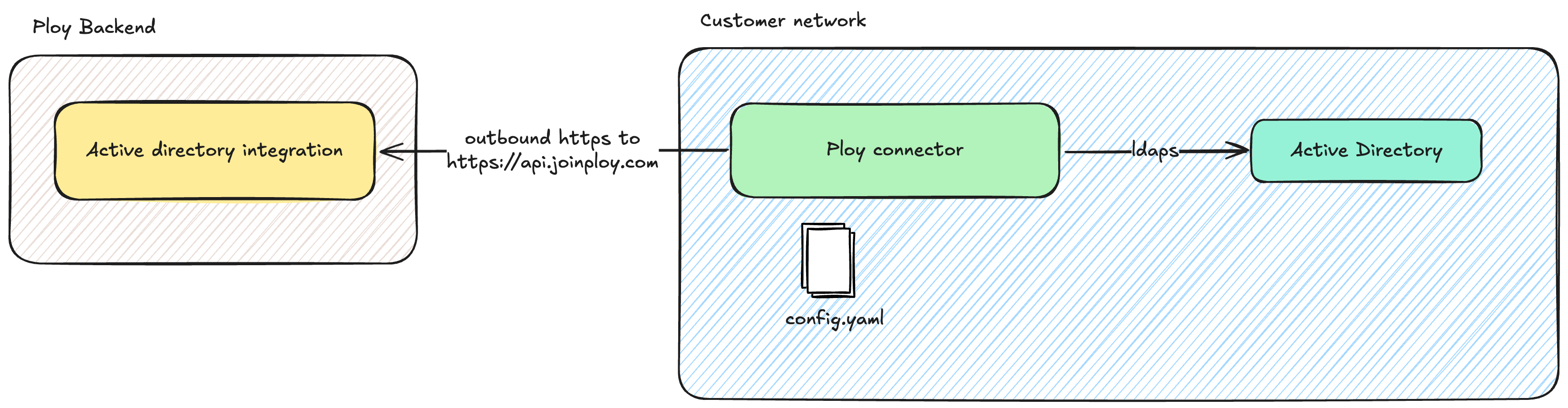
Scanning users and groups
At a configurable fixed interval (default 15 minutes) the Ploy Connector scans Active Directory users and groups within a given base DN. After the initial scan, an incremental delta scan is performed using a DirSync cookie.
Users, groups, and group memberships are uploaded to Ploy and become visible within the Ploy admin console.
If scan is the only enabled feature, the Ploy Connector operates in read-only mode and will not make any changes to data in Active Directory.
Group membership management
When enabled (see the configuration section below), group membership can be managed from within Ploy. This means Ploy is able to automatically add and remove users from groups in Active Directory.
The connector polls the Ploy server at a fixed interval (default 10 seconds) to discover any pending tasks it needs to perform. The poll interval can be increased to reduce network traffic, with a corresponding reduction in responsiveness.
Networking requirements
Connecting to Ploy
The Ploy Connector requires outbound HTTPS access to https://api.joinploy.com. All connections are initiated from the connector. The Ploy backend never initiates connections to the connector.
Authentication with Ploy
The connector uses an access token to authenticate with the Ploy backend. This token can be stored directly in the config file, or read from an environment variable or a file. See the configuration section for details.
Token rotation is performed by creating a second token in the Ploy admin console, updating the connector configuration, and then deactivating the previous token.
Supported proxy configurations
The Ploy Connector can be configured to use an HTTP proxy via the standard HTTP_PROXY, HTTPS_PROXY, and NO_PROXY environment variables.
Basic auth for HTTP proxies is supported (for example, user:pass@proxyhost).
Custom CA certificate bundles
For environments where a custom CA certificate is required for connecting to the HTTP proxy or to Active Directory, a custom CA certificate bundle can be configured. This bundle can be used either instead of, or alongside, the default CA bundle for your operating system.
Connectivity to Active Directory
The Ploy Connector needs network access to the Active Directory server you wish to connect to Ploy. It can connect using ldaps or ldap+starttls.
Service account
The Ploy Connector requires a user account configured in Active Directory which must be able to:
Bind to the directory.
Read user and group objects within the OU subtree you wish to sync, including standard attributes such as
sAMAccountName,userPrincipalName,mail,displayName,objectGUID,userAccountControl,member, andmemberOf.When in read/write mode, modify the
memberattribute on the groups Ploy will manage. This is granted by delegating "Modify the membership of a group" on the OU containing the relevant groups.
Authentication to Active Directory
Windows integrated: uses the gMSA associated with the Windows service the Ploy Connector is running as.
Simple: binds using a username and password. Configured credentials are only used within the connector and are never sent to Ploy.
Deployment
For step-by-step platform setup, see:
Configuration
The Ploy Connector is configured using a YAML file. All configuration values can either be specified in the config file directly, or loaded from an environment variable or a file.
The following options are available for Active Directory:
url: supportsldaps://andldap+starttls://.base_dn: the base DN used when querying Active Directory.enabled_features: list of enabled features, includingscanandgroup_management. If onlyscanis enabled, the Ploy Connector runs in read-only mode.auth: authentication mechanism. Eitherwindows_integratedorsimple.bind_user: full DN of the user, required when using simple auth.bind_password: password, required when using simple auth.
Updates
The Ploy Connector regularly reports its version to the Ploy backend. This allows us to keep you informed about new available versions of the connector.
Security controls
All traffic from the Ploy Connector to Ploy servers is encrypted with HTTPS using industry-standard TLS algorithms.
The Ploy Connector initiates all traffic to Ploy servers. There is no need to open any ports to the internet.
Connections to Active Directory use encryption (LDAPS or STARTTLS).
Credentials to Active Directory are only used locally by the Ploy Connector and never leave the customer network.
All credentials can be configured via environment variables instead of in config files.
All data on Ploy's servers is encrypted at rest and stored in the AWS eu-west-2 (London) region.
Events for any actions taken by the connector are logged to the Windows Event Log on Windows, and to stdout on Linux.
The Windows executable is built in our automated CI pipeline and signed using Azure Artifact Signing.