
Gets
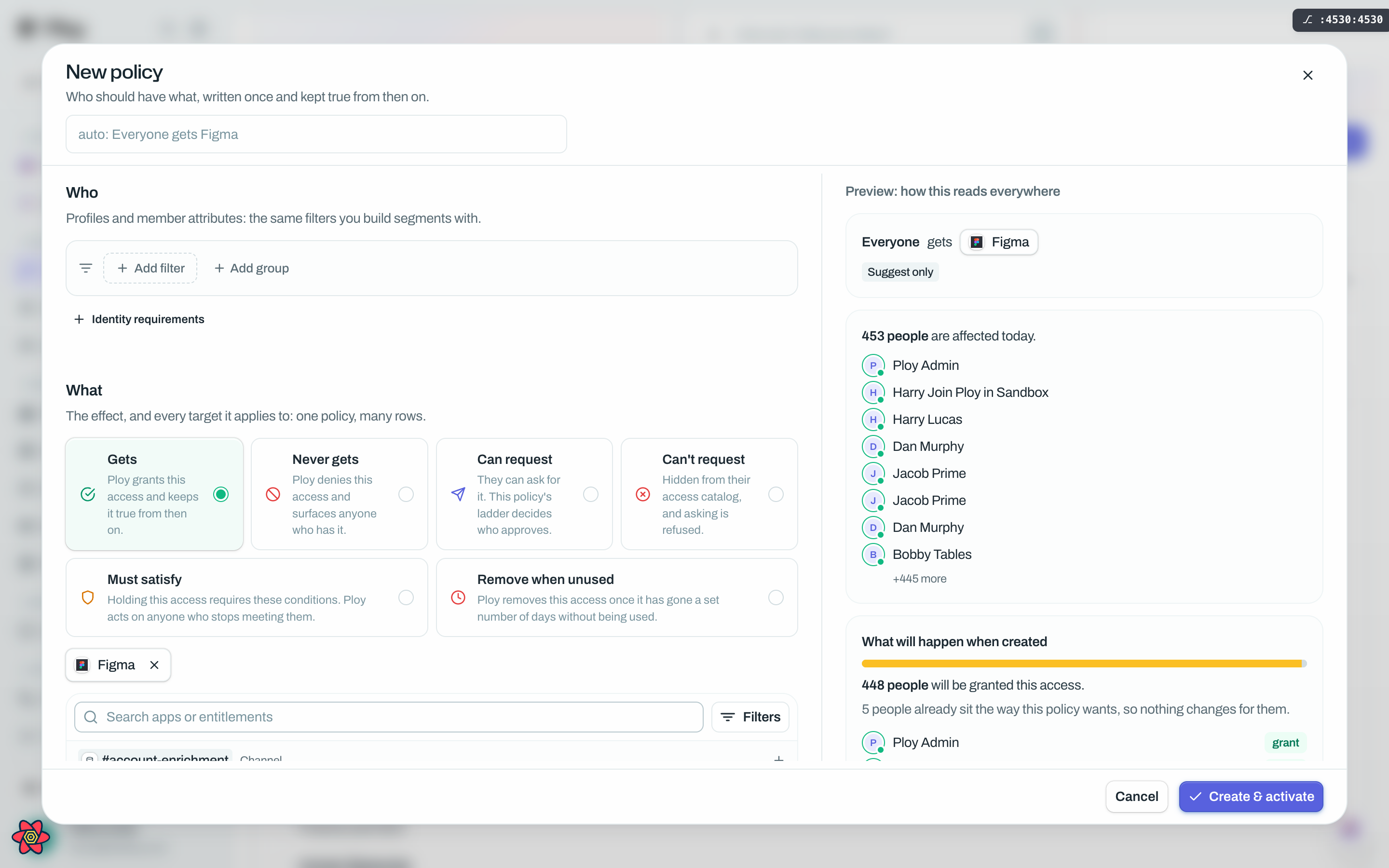
Gets is the granting effect. Its own words in the builder: "Ploy grants this access and keeps it true from then on." Use it for the access a person should simply have because of who they are, not because they asked.
What it states
A Gets policy is a standing statement, not a one-off action. Everyone the Who matches should hold the target: today, and tomorrow when somebody new joins that department. Nobody has to re-run anything when your org changes.
Get's are perfect for defining and maintain birthright and mover access. As soon as someone meets (or no longer meets the access) the engine makes the change.
When Ploy acts
Saving an active Gets policy starts a pass over that policy straight away, so provisioning normally begins in seconds. A whole-org pass also runs every 15 minutes as a safety net, which is what catches a person who joins a matching profile later, or an account that only appears after the save.
Access the policy owes somebody is proposed as a provisioning batch item and then created through exactly the same path a manual grant uses. Until it lands there is no access row at all. That in-between state is what the coverage ledger calls Awaiting: "a policy asks for it and it has not been provisioned yet." It is why a policy can read Active while nobody has anything yet.
The settings it offers
Gets carries no ladder, no terms, no condition and no day threshold. It offers the two settings every access-holding policy has.
Revocation enforcement, which decides what happens when somebody stops matching: Suggest only records it and waits for a person, Auto-suspend suspends the access automatically and reversibly, Auto-revoke removes it outright. Suggest only is where every policy starts.
Manual overrides, which decide what happens when a person strips this access by hand against the policy: Reverse puts it back and shows you what happened, Flag lets the change stand and shows it to you for review, Log lets it stand and tells nobody. Flag is preselected.
What the preview shows
The right-hand column answers two different questions, and they are not the same number.
The match count card says how many people the Who selects.
The impact preview card splits those people into who will actually change, who is already in the state you are asking for, and who is blocked. Use See who the policy leaves alone to expand the second group.
Blocked is always given a reason: denied by another policy, a removal already stands, the person has no account this policy can grant on, a condition is holding it back, or the target no longer exists.
After you activate
Open the policy from the Policies tab and the Details tab carries an outcomes panel headed with a line like "{N} of {M} will be granted access.", a tally of verdicts, and named people with a one-line verdict each.
Two other tabs appear over time. Suggested removals lists people who got this access through the policy and no longer match it, with a keep or remove decision per row. Removed is the read-only history of people whose access this policy took away.
Good to know
Gets cannot target Everything. A granting policy has to name a specific app or permission.
If a chosen target has no provisioning set up, the policy will not grant anything to anyone. The builder says so before you save and blocks Create & activate until it is fixed.
A refusal beats a grant, always. A Never gets policy over the same people and the same target wins, and the overlaps card in the preview names the people it refuses.
An active Gets policy starts provisioning immediately. If you would rather look first, save it disabled, read the numbers, then activate it. This is exactly what Luna does when it lands a birthright tier for you.
Acting automatically on more than 50 people needs a confirmation: "Activating applies this to {N} people today. That's above the confirmation threshold (50)." Choose Back or Save for {N} people.
Deleting a Gets policy does not take anyone's access away. The access stays and stops being explained, which moves it into the Unexplained slice of your coverage. The delete dialog offers Also remove it, which sends the access to your approvers rather than removing anything on the spot.