
Preview before you save
The right-hand column of the policy builder is headed "Preview: how this reads everywhere", and it answers the only question worth asking before you save: what will actually happen. It updates as you type and it changes nothing.
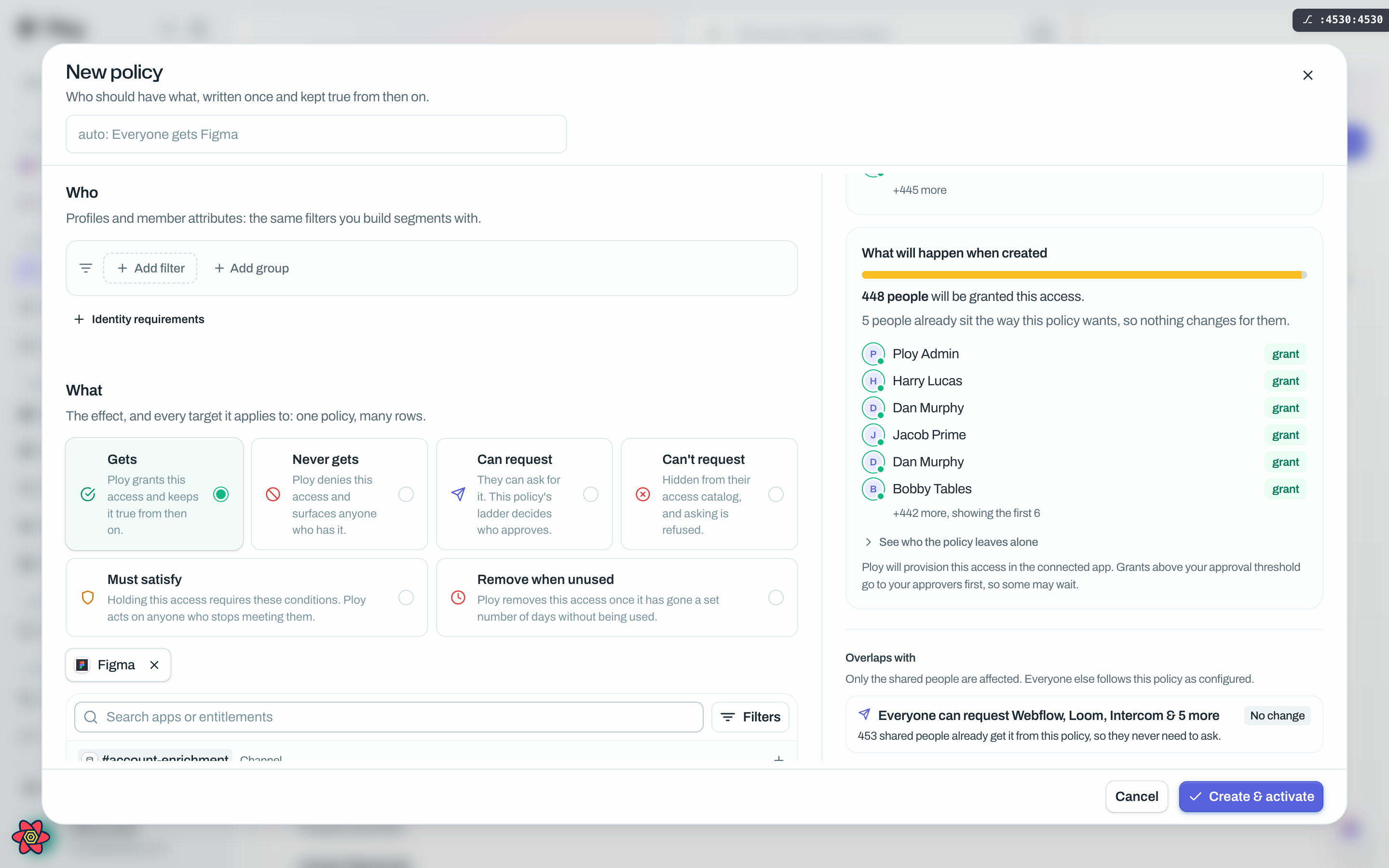
What each card tells you
The sentence. Your draft written as one plain sentence, exactly as it will read on the card, in the drawer and everywhere else. Until you pick a target it asks you to "add at least one app or entitlement". Pick several and it adds "Saves as N policy rows, shown and edited as one card", which is worth reading: one card can be many policy rows, and an edit applies to all of them.
The match count. Either "No people match this today" or "N people are affected today", with a sample of faces. This is the size of the group your Who selects. It is not the number of people who will change.
The impact preview. The honest number. It splits the matched group three ways:
Changed: the access Ploy will actually go and act on.
Already there: people who need nothing done, because they hold it, it is on its way, or somebody is already approving it. A toggle reading "See who the policy leaves alone" opens this group.
Blocked: people the policy reaches but cannot help. Each has a reason, such as denied by another policy, a removal stands, no account this policy will grant on, held back by a condition, or the resource no longer exists.
The three always add up to everyone evaluated. If your match count is large and your changed count is tiny, that is normal: most of the group already has the access.
Overlaps. Other policies already covering some of the same people, framed as "Only the shared people are affected. Everyone else follows this policy as configured." Where the other policy refuses, the framing flips, because a refusal beats any grant.
Check who this lands on. A person picker for the one question a count cannot answer. Search a name and it says either "In scope: {name} is covered by this policy" or "Out of scope: this policy wouldn't touch {name}".
Saving
The footer button reads Create & activate on a new policy and Save changes on an edit. It stays disabled until the draft has at least one target, whatever else the effect you chose requires, and a clean provisioning check.
If a chosen app cannot provision access yet, an amber strip appears in the left column: "Until provisioning is set up for {names}, this policy will not grant access to anyone", with a Set up provisioning button that does not lose your draft.
If the policy is about to touch a lot of people, the footer itself turns amber rather than opening a separate dialog: "Activating applies this to N people today. That's above the confirmation threshold (50)." You then choose Back or Save for N people.
Good to know
The confirmation is about automatic action, not size alone. It appears when a policy acts without waiting for a person, meaning anything stronger than Suggest only, and matches more than the threshold. The threshold starts at 50.
An edit shows what people lose as well. Narrow a policy's Who and the preview counts the people losing the access, the refusal or the request route they had, on top of the usual three buckets.
Request drafts are previewed differently. For Can request and Can't request the preview compares what the request gate would answer, not who holds what. People move between newly refused, newly auto approved, a changed approval route and changed terms.
The count is people, not pieces of access. Somebody losing two apps counts once in the total, but shows twice in the sample list, once per app.
The terms in the preview are the terms people meet. The request terms shown here are resolved by the same logic the live request gate uses, so the two can never disagree.
Nothing in the preview touches anybody. It runs before the policy exists and it writes nothing.