Home Contact us
Dashboard
Changelog
Luna
Generate automation flows with Luna AIManage Luna AI persistent memoryWhat are Luna playbooks?Artifacts
Resources
Setting Up a Source of TruthManaging EntitlementsImporting UsersAccess PolicyUnderstanding Access TypesPrimary Owners vs. OwnersWhat is Managed Access?Bulk Entitlement ImportView transitive access for resources
Access Reviews
Automatic access reviewsNotification SettingsDefining scope in an access review
Workflows
Actions
Triggers
Introduction to Workflows
Integrations
Ticketing Systems
Infrastructure
HRIS
HumaansLuccaBambooHRPersonioHiBob
Communication
Workspace & Identity
Anthropic Integration
Notifications
Daily reminders
Offboarding
Create an Immediate OffboardingOffboarding Overview
Settings
Understanding Ploy Permissions and Roles
Browser Extension
FAQ's
Setup
Browser Extension
Employees
Profiles
HRIS

Humaans

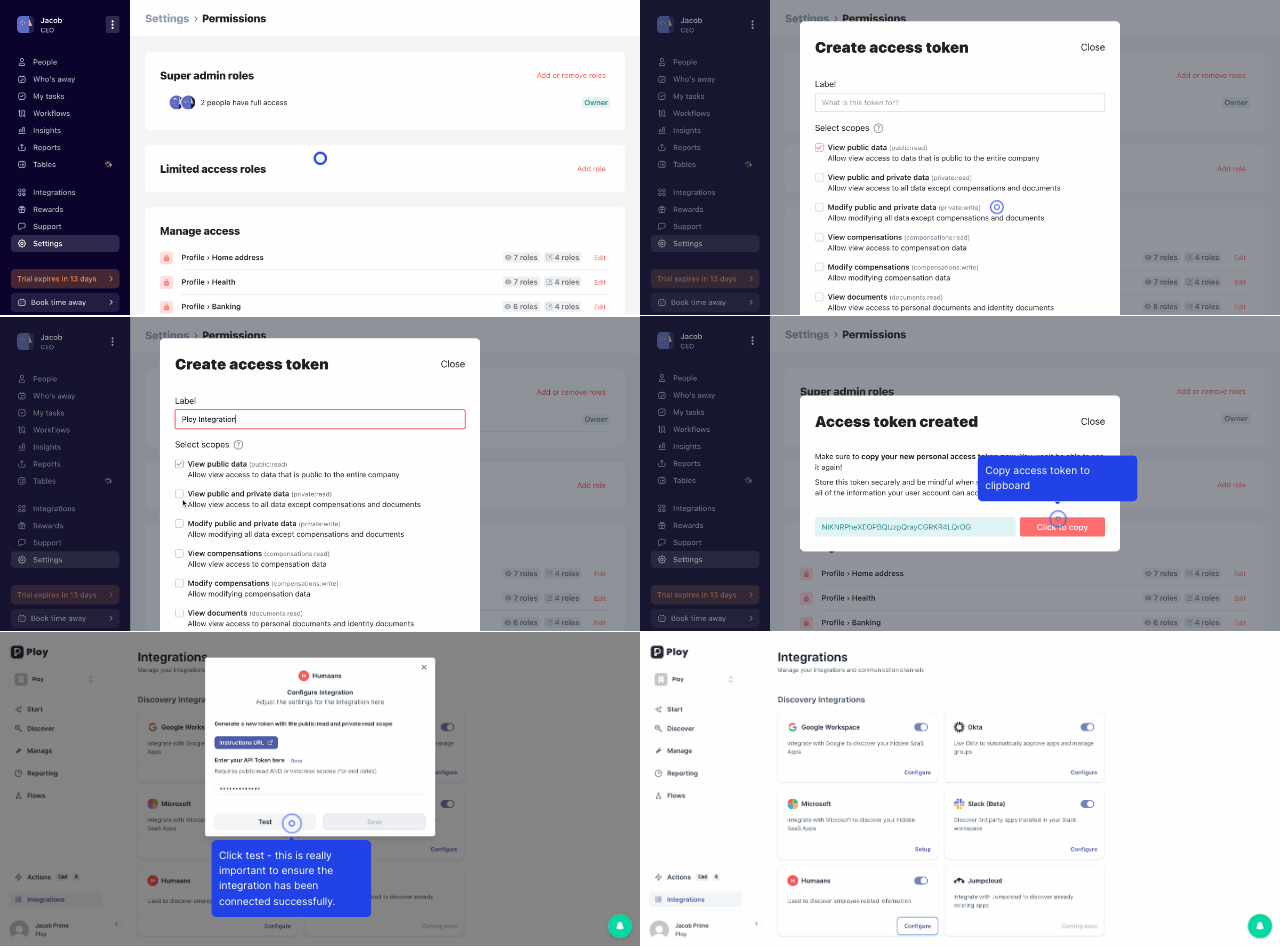
Follow the steps below to integrate your Humaans HRIS with Ploy in seconds.

  1. Go to Humaans and click the three dots and navigate to API Access Tokens

  2. Click Generate a new token

  3. Add a label name to the token e.g. Ploy Integration

    1. Click the check box view public private data

  4. Copy the API token and go to Ploy at https://app.joinploy.com/

  5. Click integrations on the bottom left

  6. Select Humaans and click the configure button

  7. Paste the API token and click test

  8. Save the integration

Was this helpful?
Was this helpful?